
Build a RAG App for Documentation Q&A using Rails

I had wanted to build something in the AI space for about a year now but didn’t know where to start. I chose a RAG (Retrieval-Augmented Generation) app because it felt approachable: you ask a question and get an answer grounded only in your blog content, so I could learn embeddings, vector search, and prompting without dealing with training or fine-tuning.
The full app is open sourced at blog-ai-chat-app. You can clone it and run it locally to see it in action.
This post walks you through how it was built so you can do the same or adapt it to your own blog.
Without further ado, let’s jump right in.
Tested and working in #
- Ruby 3.4+
- Rails 8.1
- PostgreSQL with pgvector extension
- Ollama (qwen2.5:7b-instruct, nomic-embed-text)
- RubyLLM 1.12
RAG … What is RAG? #
RAG stands for Retrieval-Augmented Generation. In short:
- You store your content (e.g. blog posts) as chunks and turn each chunk into a vector (embedding) using an embedding model.
- When the user asks a question, you turn the question into a vector and search for the most similar chunks (e.g. with cosine similarity or a vector index).
- You pass those chunks as context to an LLM and ask it to answer only from that context.
So the model doesn’t rely on its training alone, it “retrieves” relevant bits of your content and then “generates” an answer from them. That keeps answers grounded in your blog and reduces hallucination.
Project setup #
In this project we use:
- Rails for the app and database.
- Ruby LLM for search (embeddings, tool-calling, and LLM-generated answers).
- Ollama for local models (no API keys, free to run).
- pgvector (via the Neighbor gem) for vector search in PostgreSQL.
Generate a new Rails app #
Create a new Rails app with PostgreSQL (required for pgvector later) and TailwindCSS:
rails new blog_ai_chat_app --database=postgresql --css=tailwind
cd blog_ai_chat_app
bin/rails db:create
Use whatever other options you prefer (e.g. --skip-test). The important part is postgreSQL for vector search and tailwind for the styling.
Setup Ruby LLM #
Add the gem and run the generator to create base for RubyLLM:
# Gemfile
gem "ruby_llm"
bundle install
bin/rails generate ruby_llm:install
The Ruby LLM installer generates migrations and models for you. You will see new tables such as chats, messages, tool_calls, and models along with models like Chat, Message and other related models. Run migrations after the generator finishes:
bin/rails db:migrate
The app uses these models later for the RAG flow (user question → tool call to search the blog → LLM-generated answer). So don’t skip these steps of running the generator and applying migrations.
Setup pg_vector #
We need vector support in PostgreSQL for storing embeddings and doing similarity search.
Install pgvector on your machine (macOS example):
brew install pgvector
In the Rails app, we use the Neighbor gem for the vector type, add the following to the Gemfile:
# Gemfile
gem "neighbor"
Then run the bundle install and generator:
bundle install
bin/rails generate neighbor:vector
bin/rails db:migrate
The generator adds a migration that enables the vector extension. We are still missing has_neighbors declaration in the model for the neighbor gem to work, we will add that after generating the relevant model in upcoming sections. Let’s configure Ollama before we dive into those stuffs.
Note: pgvector via homebrew only works for postgresql@17 and postgresql@18, if you have older version of postgresql then you need to install from the source. You can do so by following instructions at Install pgvector from source
Configure Ollama #
I chose Ollama because it’s free and runs locally. The tradeoff is latency, with a 7B model on my machine (M1 Mac) I often wait around a minute for a response. I was fine with that because I wanted to learn more about local models and avoid API keys.
-
Install Ollama
You can visit ollama.com for installation instructions. If you are using macOS you can install it with brew:
brew install ollamaYou can then start it with:
ollama serve -
Pull the model (used to generate answers from retrieved context)
While you have the ollama running in one tab, open a new tab in your terminal and run the following command:
ollama pull qwen2.5:7b-instruct -
Pull the embedding model (used for RAG retrieval):
ollama pull nomic-embed-text
Then point Ruby LLM at Ollama and set the default model and embedding model:
# config/initializers/ruby_llm.rb
require "ruby_llm"

RubyLLM.configure do |config|
  config.ollama_api_base = "http://localhost:11434/v1"
  config.default_model = "qwen2.5:7b-instruct"
  config.default_embedding_model = "nomic-embed-text"
  config.use_new_acts_as = true
end
No API keys needed. If you prefer another provider (e.g. OpenAI or Gemini), you can set the corresponding API key and change default_model / default_embedding_model in the same file.
Blog ingestion #
For the RAG app to work we need to fetch the blog content from a blog, split each of the blog into chunks, compute embeddings, and store them in the database so we can search later.
In this guide, I have used my personal blog but you can just change the URL and the rake task should work for your blog as well.
Add tables to store blog chunks and articles #
We need two tables: article_chunks (for RAG: chunk text, embedding, and source metadata) and articles (for listing and displaying full post HTML).
-
Model and migration for article_chunks
Run the following command to add a model and migration for Article Chunk:
bin/rails generate model ArticleChunk content:text embedding:vector source_url:string source_title:string -
Model and migration for articles
Run the following command to add a model and migration for Article:
bin/rails generate model Article source_url:string:uniq title:string content:textAdd validations to the Article model so we don’t store invalid data:
 # app/models/article.rb
 class Article < ApplicationRecord
   validates :source_url, presence: true, uniqueness: true
 end
Finally, run the migration with:
bin/rails db:migrate
Enable nearest neighbor search #
Declare the vector column in the ArticleChunk model so the Neighbor gem can perform similarity search:
# app/models/article_chunk.rb
class ArticleChunk < ApplicationRecord
  has_neighbors :embedding
end
Add a rake task to actually ingest blogs #
Add the following rake task to fetch articles from the blog, extract text and HTML, chunk the text, compute embeddings, and store both chunks and full articles.
# lib/tasks/ingest_blog.rake
namespace :blog do
  MAX_ARTICLES = 100

  desc "Fetch and store article chunks with embeddings (follows pagination, max #{MAX_ARTICLES} articles)"
  task ingest: :environment do
    require "ruby_llm"
    require "nokogiri"
    require "httparty"

    # NOTE: change this to your own blog URL if you want
    base_url = "https://prabinpoudel.com.np"

    # Collect article URLs from index + paginated pages. Skip /articles/page/N/ itself.
    article_urls = []
    page_num = 1

    loop do
      index_url =
        (
          if page_num == 1
            "#{base_url}/articles/"
          else
            "#{base_url}/articles/page/#{page_num}/"
          end
        )
      puts "Scanning index: #{index_url}"
      page = HTTParty.get(index_url)
      break unless page.success?

      doc = Nokogiri.HTML(page.body)
      links =
        doc
          .css("a")
          .map { |a| a["href"] }
          .compact
          .map { |href| URI.join(base_url, href).to_s }
          .uniq

      # Only links to actual articles: exclude index and pagination pages
      new_articles =
        links.select do |url|
          next false if url == "#{base_url}/articles"
          next false if url == "#{base_url}/articles/"
          next false if url.match?(%r{/articles/page/\d+/?\z})
          url.include?("/articles/")
        end

      new_articles.each do |url|
        article_urls << url unless article_urls.include?(url)
      end

      break if article_urls.size >= MAX_ARTICLES

      # Next page: try page_num + 1; stop if this page had no new article links
      has_next =
        links.any? { |u| u.match?(%r{/articles/page/#{page_num + 1}/?}) }
      break unless has_next

      page_num += 1
    end

    article_urls = article_urls.first(MAX_ARTICLES)
    puts "Found #{article_urls.size} article(s) to ingest"

    article_urls.each do |full_url|
      puts "Fetching #{full_url}"

      page = HTTParty.get(full_url)
      next unless page.success?

      page_doc = Nokogiri.HTML(page.body)
      article_node = page_doc.css("article").first
      next unless article_node

      source_title =
        article_node.css("h1, h2").first&.text&.strip.presence || full_url

      # Store full article HTML for display (code blocks, headings, etc.)
      full_html = article_node.inner_html
      fragment = Nokogiri::HTML.fragment(full_html)
      fragment
        .css("a[href]")
        .each do |a|
          href = a["href"].to_s.strip
          a["href"] = URI.join(full_url, href).to_s if href.start_with?("/")
        end
      Article.find_or_initialize_by(source_url: full_url).update!(
        title: source_title,
        content: fragment.to_html
      )

      # Extract text but preserve hyperlinks as "link text (url)" so references are stored
      content = []
      article_node.traverse do |node|
        if node.is_a?(Nokogiri::XML::Text)
          # Skip text inside <a> so we don't duplicate link text
          content << node.text if node.parent.name != "a"
        elsif node.name == "a" && node["href"].present?
          link_text = node.text.strip.presence || node["href"]
          href = node["href"].strip
          href = URI.join(full_url, href).to_s if href.start_with?("/")
          content << " #{link_text} (#{href}) "
        end
      end

      content = content.compact.join.gsub(/\s+/, " ").strip

      chunks = content.scan(/.{1,800}(?:\n|\z)/m)

      chunks.each do |chunk|
        embedding =
          RubyLLM.embed(chunk, provider: :ollama, assume_model_exists: true)

        ArticleChunk.create!(
          content: chunk,
          embedding: embedding.vectors,
          source_url: full_url,
          source_title: source_title
        )
      end
    end
  end
end
Make sure Ollama is running so the embedding model is available when RubyLLM calls it with RubyLLM.embed:
$ ollama serve
We also need httparty for fetching articles from the blog, install it with the following command:
bundle add httparty
Now run the rake task to ingest blogs with:
bin/rails blog:ingest
And that takes care of the basic app setup. We can finally move on to the exciting part: UI.
List all articles in the blog #
We want users to to browse ingested posts and open the full article in the app. Let’s start with the routes.
Routes
Add the following to the routes file so blog list is shown in the root path of the app:
# config/routes.rb
Rails.application.routes.draw do
  root "articles#index"
  # ...
end
Controller
Load all articles for the sidebar and, when ?article= is present, load that article’s title and HTML for the main area:
# app/controllers/articles_controller.rb
class ArticlesController < ApplicationController
  def index
    @articles = Article.all
    @selected_url = params[:article].presence

    return unless @selected_url.present?

    article = Article.find_by(source_url: @selected_url)
    @selected_article_title = article&.title.presence || @selected_url
    @selected_article_content = article&.content
  end
end
Note: You would normally use “show” action to load the actual page in the production app, I just dumped everything in the index action to make the blog a little shorter in size.
View
We will generate a list of articles in the sidebar and show the blog detail to the right. Add the following to mimic that behavior:
<!-- app/views/articles/index.html.erb -->
<div class="flex flex-1 min-h-0">
  <div class="flex flex-1 pt-14 min-h-0">
    <aside class="w-64 shrink-0 border-r border-gray-200 bg-white overflow-y-auto">
      <nav class="p-3">
        <p class="px-3 py-2 text-xs font-semibold uppercase tracking-wider text-gray-400">Blog posts</p>
        <% if @articles.any? %>
          <ul class="space-y-0.5">
            <% @articles.each do |art| %>
              <li>
                <%= link_to art[:title],
                            root_path(article: art[:source_url]),
                            class: "block rounded-lg px-3 py-2 text-sm text-gray-700 hover:bg-gray-100 #{'bg-gray-100 font-medium' if @selected_url == art[:source_url]}" %>
              </li>
            <% end %>
          </ul>
        <% else %>
          <p class="px-3 py-2 text-sm text-gray-500">No posts ingested yet.</p>
        <% end %>
      </nav>
    </aside>

    <main class="flex-1 min-w-0 overflow-y-auto bg-[#f7f7f8]">
      <% if @selected_url.present? %>
        <% if @selected_article_content.present? %>
          <article class="mx-8 px-6 py-8">
            <header class="mb-8 border-b border-gray-200 pb-6">
              <h1 class="text-3xl font-semibold tracking-tight text-gray-900"><%= @selected_article_title %></h1>
              <a href="<%= @selected_url %>" target="_blank" rel="noopener" class="mt-3 inline-flex items-center text-sm font-medium text-[#00638a] hover:underline">
                View original post
                <svg class="ml-1 h-4 w-4" fill="none" stroke="currentColor" viewBox="0 0 24 24"><path stroke-linecap="round" stroke-linejoin="round" stroke-width="2" d="M10 6H6a2 2 0 00-2 2v10a2 2 0 002 2h10a2 2 0 002-2v-4M14 4h6m0 0v6m0-6L10 14" /></svg>
              </a>
            </header>
            <div class="articles-article-body text-gray-700 [&_p]:mb-4 [&_p:last-child]:mb-0 [&_p]:leading-relaxed [&_a]:text-[#00638a] [&_a]:underline [&_a:hover]:no-underline [&_ul]:my-4 [&_ul]:list-disc [&_ul]:pl-6 [&_ol]:my-4 [&_ol]:list-decimal [&_ol]:pl-6 [&_li]:my-1 [&_pre]:my-4 [&_pre]:rounded-lg [&_pre]:bg-gray-100 [&_pre]:p-4 [&_pre]:overflow-x-auto [&_pre]:text-sm [&_pre_code]:bg-transparent [&_pre_code]:p-0 [&_code]:rounded [&_code]:bg-gray-100 [&_code]:px-1.5 [&_code]:py-0.5 [&_code]:text-sm [&_h1]:text-2xl [&_h1]:font-semibold [&_h1]:mt-8 [&_h1]:mb-4 [&_h2]:text-xl [&_h2]:font-semibold [&_h2]:mt-6 [&_h2]:mb-3 [&_h3]:text-lg [&_h3]:font-medium [&_h3]:mt-4 [&_h3]:mb-2 [&_blockquote]:border-l-4 [&_blockquote]:border-gray-300 [&_blockquote]:pl-4 [&_blockquote]:italic [&_blockquote]:text-gray-600">
              <%= sanitize_article_html(@selected_article_content) %>
            </div>
          </article>
        <% else %>
          <div class="flex flex-1 items-center justify-center p-12">
            <div class="rounded-xl border border-gray-200 bg-white p-8 text-center max-w-sm text-gray-500">
              <p class="font-medium">Content not found</p>
              <p class="mt-1 text-sm">Re-run <code class="rounded bg-gray-100 px-1.5 py-0.5">rails blog:ingest</code> to fetch this post.</p>
            </div>
          </div>
        <% end %>
      <% else %>
        <div class="flex flex-1 items-center justify-center p-12">
          <div class="rounded-xl border border-gray-200 bg-white p-12 text-center text-gray-500 max-w-sm">
            <svg class="mx-auto h-12 w-12 text-gray-300" fill="none" stroke="currentColor" viewBox="0 0 24 24">
              <path stroke-linecap="round" stroke-linejoin="round" stroke-width="1.5" d="M19 11H5m14 0a2 2 0 012 2v6a2 2 0 01-2 2H5a2 2 0 01-2-2v-6a2 2 0 012-2m14 0V9a2 2 0 00-2-2M5 11V9a2 2 0 012-2m0 0V5a2 2 0 012-2h6a2 2 0 012 2v2M7 7h10" />
            </svg>
            <p class="mt-4 font-medium text-gray-600">Select a post from the left</p>
            <p class="mt-1 text-sm">or use the search bar above to ask a question.</p>
          </div>
        </div>
      <% end %>
    </main>
  </div>
</div>
Add a helper that sanitizes the stored HTML so you can safely render @selected_article_content:
# app/helpers/application_helper.rb
module ApplicationHelper
  # Sanitizes stored article HTML (from Article) for safe display. Keeps structure, code blocks, links.
  def sanitize_article_html(html)
    return "" if html.blank?

    sanitize(
      html,
      tags: %w[
        p
        div
        span
        br
        h1
        h2
        h3
        h4
        h5
        h6
        a
        strong
        em
        b
        i
        code
        pre
        ul
        ol
        li
        blockquote
        hr
        img
        table
        thead
        tbody
        tr
        th
        td
      ],
      attributes: {
        "a" => %w[href target rel class],
        "img" => %w[src alt width height class],
        "code" => [ "class" ],
        "pre" => [ "class" ],
        "div" => [ "class" ],
        "span" => [ "class" ]
      }
    )
  end
end
We have already come up a long way. We have the UI to list and view blogs in our app now. Let’s quickly take a look at how the UI looks in the browser, fire up the server with:
bin/dev
Then visit http://localhost:3000 and you should see a UI like this:
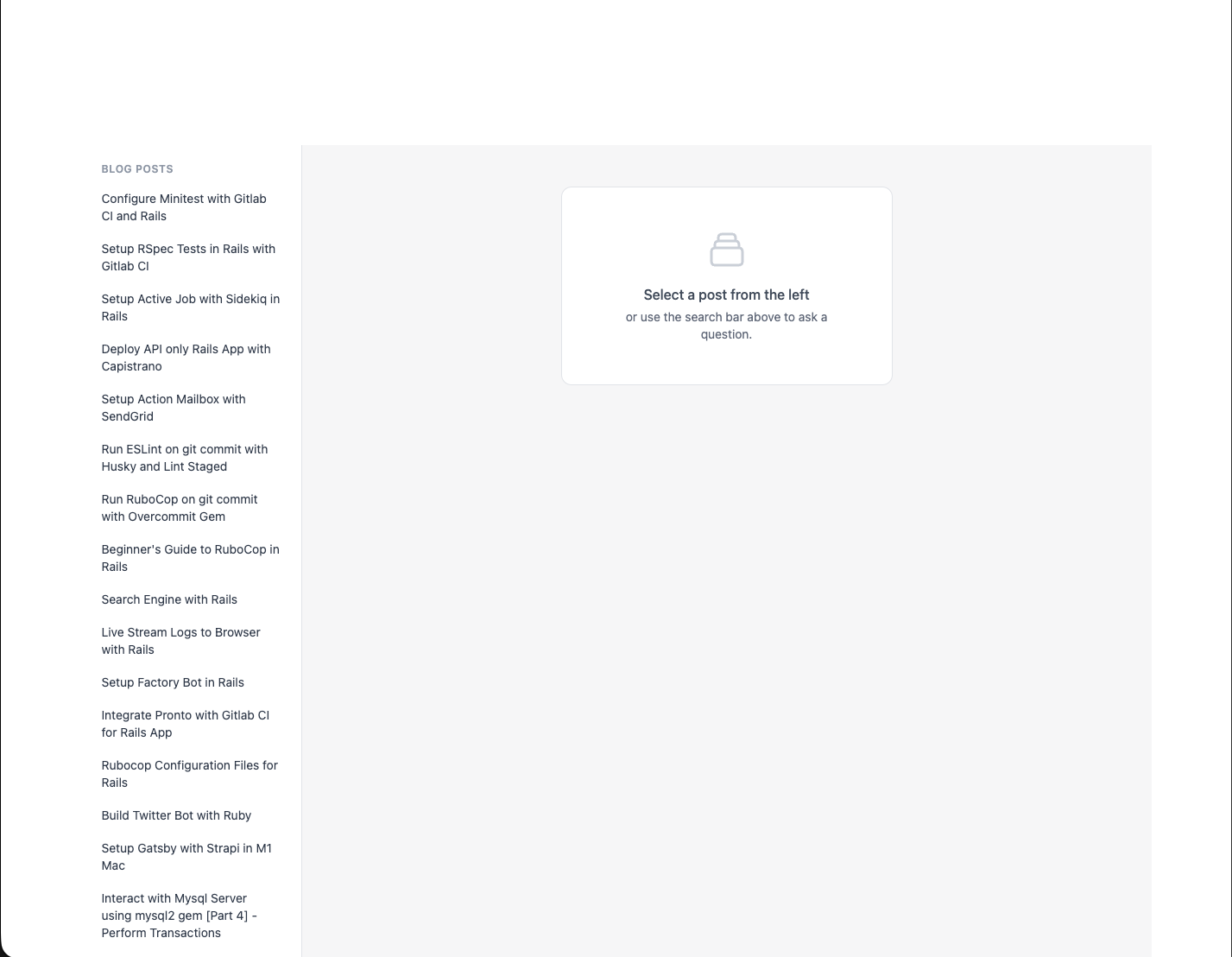
Not that good but hey, it’s also not that bad. You can fix the CSS part of the app yourself, you can reference the Github repo as well for this. We won’t be going into that here.
RAG app: ask a question, get an answer #
We want a search box at the top of the app where users can type a question and open a dropdown overlay to see the answer. The flow: search the chunks, pass context to the LLM, and show the generated reply grounded to your blog content.
Files to generate #
- Controller: handle the question, run the RAG flow, return the answer.
- View: a search box and an area for the answer. We use Turbo Streams so the answer updates in place without a full reload.
- Tool: Ruby LLM–powered class that runs the blog search and feeds context to the LLM for the answer
Controller and routes for the search #
Routes:
Add following to the routes file:
# config/routes.rb
Rails.application.routes.draw do
  # ....
  post "search", to: "search#create", as: :search
  # ....
end
Controller: create a chat, call the blog search “tool” then ask the LLM with the retrieved context:
Create a file app/controllers/search_controller.rb and add the following:
# app/controllers/search_controller.rb
class SearchController < ApplicationController
  def create
    question = (params[:q] || params[:query]).to_s.strip

    if question.blank?
      @error_message = "Query is required"

      respond_to { |format| format.turbo_stream }
      return
    end

    chat = Chat.create!(chat_attrs)
    rag_chat = chat.with_tool(BlogSearch).with_instructions(system_prompt)
    rag_chat.ask(question)

    assistant = chat.messages.where(role: "assistant").last
    @answer_html =
      Redcarpet::Markdown.new(
        Redcarpet::Render::HTML.new(filter_html: true),
        fenced_code_blocks: true,
        autolink: true
      ).render(assistant&.content.to_s)

    respond_to { |format| format.turbo_stream }
  rescue StandardError => e
    Rails.logger.error(
      "[Search] #{e.message}\n#{e.backtrace.first(5).join("\n")}"
    )
    @error_message = "Search failed. Please try again."

    respond_to { |format| format.turbo_stream }
  end

  private

  def chat_attrs
    {
      model: "qwen2.5:7b-instruct",
      provider: :ollama,
      assume_model_exists: true
    }
  end
end
Do you notice “system_prompt” that we are passing to with_instructions in the rag_chat? We will talk about that next.
Basic prompt for answering questions #
The system prompt tells the LLM to (1) use the tool to get blog context, (2) read only that context, and (3) answer only from it.
Add the following to the search_controller just below the chat_attrs:
# app/controllers/search_controller.rb
def system_prompt
  <<~PROMPT
    You are an assistant that answers questions ONLY using the author's blog.

    You MUST:
    1. Call the BlogSearch tool before answering.
    2. Read ONLY the content between BLOG_CONTEXT_START and BLOG_CONTEXT_END.
    3. If the context equals "NO_RELEVANT_BLOG_CONTENT", respond with: "I couldn't find anything about this in the blog."
    4. Always return the response in Markdown format.

    You are FORBIDDEN from using external knowledge.
  PROMPT
end
The BlogSearch tool (a Ruby LLM tool) does the vector search, builds a string with BLOG_CONTEXT_START … BLOG_CONTEXT_END, or returns NO_RELEVANT_BLOG_CONTENT when there are no matches. The LLM is instructed to call this tool first, then answer only from that text.
Blog Search Tool #
Create a new file app/tools/blog_search.rb and add the following:
# app/tools/blog_search.rb
class BlogSearch < RubyLLM::Tool
  description "Searches the author's blog posts for relevant content only."
  param :query, desc: "User question about the blog"

  def execute(query:)
    result = search(query)

    { context: build_context(result) }.to_json
  end

  def search(query)
    q = query.to_s.strip

    return empty_result if q.blank?

    pre_limit = 10

    # Vector (semantic) search
    embedding =
      RubyLLM.embed(q, provider: :ollama, assume_model_exists: true).vectors
    vector_chunks =
      ArticleChunk
        .nearest_neighbors(:embedding, embedding, distance: "cosine")
        .limit(pre_limit)
        .to_a

    return empty_result if vector_chunks.empty?

    context_parts = []

    vector_chunks.each do |chunk|
      context_parts << <<~TEXT.strip
        #{chunk.content}
      TEXT
    end

    {
      context: context_parts.join("\n\n---\n\n")
    }
  end

  private

  def empty_result
    { context: "NO_RELEVANT_BLOG_CONTENT", sources: [] }
  end

  def build_context(result)
    <<~TEXT
      BLOG_CONTEXT_START
      #{result[:context]}
      BLOG_CONTEXT_END
    TEXT
  end
end
We use redcarpet gem to convert markdown to HTML while displaying answers, add it with the following command:
bundle add redcarpet
Search bar to ask questions and display answers #
The backend is wired up for the RAG flow; we still need a search bar in the UI so users can ask questions.
Replace the current code inside app/views/articles/index.html.erb with the following to include the search bar with overlay that handles question and answer:
<!-- app/views/articles/index.html.erb -->
<% content_for :body_class, "h-screen overflow-hidden flex flex-col bg-[#f7f7f8]" %>

<div class="flex flex-1 min-h-0" data-controller="search-overlay">
  <header class="fixed top-0 left-0 right-0 z-30 flex h-14 items-center border-b border-gray-200 bg-white px-4 shadow-sm">
    <div class="relative w-full max-w-2xl mx-auto">
      <%= form_with url: search_path, method: :post, class: "flex", data: { turbo_stream: true, search_overlay_target: "form", action: "turbo:submit-start->search-overlay#onSubmitStart turbo:submit-end->search-overlay#onSubmitEnd" } do %>
        <input type="search"
               name="q"
               placeholder="Search the blog…"
               autocomplete="off"
               class="w-full rounded-l-xl border border-gray-300 bg-gray-50 py-2.5 pl-4 pr-10 text-[15px] text-gray-900 placeholder-gray-500 focus:border-[#00638a] focus:bg-white focus:outline-none focus:ring-2 focus:ring-[#00638a]/20"
               data-search-overlay-target="input">
        <button type="submit"
                class="rounded-r-xl border border-l-0 border-gray-300 bg-[#00638a] px-4 text-white hover:bg-[#004d66] focus:outline-none focus:ring-2 focus:ring-[#00638a]/30"
                data-search-overlay-target="submitBtn">
          <svg class="h-5 w-5" fill="none" stroke="currentColor" viewBox="0 0 24 24"><path stroke-linecap="round" stroke-linejoin="round" stroke-width="2" d="M21 21l-6-6m2-5a7 7 0 11-14 0 7 7 0 0114 0z" /></svg>
        </button>
      <% end %>
      <div id="search-panel" data-search-overlay-target="panel"
           class="absolute top-full left-0 right-0 mt-1 hidden max-h-[min(70vh,28rem)] overflow-hidden rounded-xl border border-gray-200 bg-white shadow-xl"
           data-action="click->search-overlay#keepOpen">
        <div id="search-result" data-search-overlay-target="result" class="overflow-y-auto p-4 max-h-[min(70vh,28rem)]">
          <p class="text-sm text-gray-500">Type a question and press Enter to search.</p>
        </div>
        <div id="search-loading" data-search-overlay-target="loading" class="hidden p-6 text-center text-gray-500">
          <span class="inline-block h-6 w-6 animate-spin rounded-full border-2 border-[#00638a] border-t-transparent"></span>
          <p class="mt-2 text-sm">Searching…</p>
        </div>
        <div id="search-error" data-search-overlay-target="error" class="hidden p-4 text-sm text-red-600"></div>
      </div>
    </div>
  </header>

  <div class="flex flex-1 pt-14 min-h-0">
    <aside class="w-64 shrink-0 border-r border-gray-200 bg-white overflow-y-auto">
      <nav class="p-3">
        <p class="px-3 py-2 text-xs font-semibold uppercase tracking-wider text-gray-400">Blog posts</p>
        <% if @articles.any? %>
          <ul class="space-y-0.5">
            <% @articles.each do |art| %>
              <li>
                <%= link_to art[:title],
                            root_path(article: art[:source_url]),
                            class: "block rounded-lg px-3 py-2 text-sm text-gray-700 hover:bg-gray-100 #{'bg-gray-100 font-medium' if @selected_url == art[:source_url]}" %>
              </li>
            <% end %>
          </ul>
        <% else %>
          <p class="px-3 py-2 text-sm text-gray-500">No posts ingested yet.</p>
        <% end %>
      </nav>
    </aside>

    <main class="flex-1 min-w-0 overflow-y-auto bg-[#f7f7f8]">
      <% if @selected_url.present? %>
        <% if @selected_article_content.present? %>
          <article class="mx-8 px-6 py-8">
            <header class="mb-8 border-b border-gray-200 pb-6">
              <h1 class="text-3xl font-semibold tracking-tight text-gray-900"><%= @selected_article_title %></h1>
              <a href="<%= @selected_url %>" target="_blank" rel="noopener" class="mt-3 inline-flex items-center text-sm font-medium text-[#00638a] hover:underline">
                View original post
                <svg class="ml-1 h-4 w-4" fill="none" stroke="currentColor" viewBox="0 0 24 24"><path stroke-linecap="round" stroke-linejoin="round" stroke-width="2" d="M10 6H6a2 2 0 00-2 2v10a2 2 0 002 2h10a2 2 0 002-2v-4M14 4h6m0 0v6m0-6L10 14" /></svg>
              </a>
            </header>
            <div class="articles-article-body text-gray-700 [&_p]:mb-4 [&_p:last-child]:mb-0 [&_p]:leading-relaxed [&_a]:text-[#00638a] [&_a]:underline [&_a:hover]:no-underline [&_ul]:my-4 [&_ul]:list-disc [&_ul]:pl-6 [&_ol]:my-4 [&_ol]:list-decimal [&_ol]:pl-6 [&_li]:my-1 [&_pre]:my-4 [&_pre]:rounded-lg [&_pre]:bg-gray-100 [&_pre]:p-4 [&_pre]:overflow-x-auto [&_pre]:text-sm [&_pre_code]:bg-transparent [&_pre_code]:p-0 [&_code]:rounded [&_code]:bg-gray-100 [&_code]:px-1.5 [&_code]:py-0.5 [&_code]:text-sm [&_h1]:text-2xl [&_h1]:font-semibold [&_h1]:mt-8 [&_h1]:mb-4 [&_h2]:text-xl [&_h2]:font-semibold [&_h2]:mt-6 [&_h2]:mb-3 [&_h3]:text-lg [&_h3]:font-medium [&_h3]:mt-4 [&_h3]:mb-2 [&_blockquote]:border-l-4 [&_blockquote]:border-gray-300 [&_blockquote]:pl-4 [&_blockquote]:italic [&_blockquote]:text-gray-600">
              <%= sanitize_article_html(@selected_article_content) %>
            </div>
          </article>
        <% else %>
          <div class="flex flex-1 items-center justify-center p-12">
            <div class="rounded-xl border border-gray-200 bg-white p-8 text-center max-w-sm text-gray-500">
              <p class="font-medium">Content not found</p>
              <p class="mt-1 text-sm">Re-run <code class="rounded bg-gray-100 px-1.5 py-0.5">rails blog:ingest</code> to fetch this post.</p>
            </div>
          </div>
        <% end %>
      <% else %>
        <div class="flex flex-1 items-center justify-center p-12">
          <div class="rounded-xl border border-gray-200 bg-white p-12 text-center text-gray-500 max-w-sm">
            <svg class="mx-auto h-12 w-12 text-gray-300" fill="none" stroke="currentColor" viewBox="0 0 24 24">
              <path stroke-linecap="round" stroke-linejoin="round" stroke-width="1.5" d="M19 11H5m14 0a2 2 0 012 2v6a2 2 0 01-2 2H5a2 2 0 01-2-2v-6a2 2 0 012-2m14 0V9a2 2 0 00-2-2M5 11V9a2 2 0 012-2m0 0V5a2 2 0 012-2h6a2 2 0 012 2v2M7 7h10" />
            </svg>
            <p class="mt-4 font-medium text-gray-600">Select a post from the left</p>
            <p class="mt-1 text-sm">or use the search bar above to ask a question.</p>
          </div>
        </div>
      <% end %>
    </main>
  </div>

  <div data-search-overlay-target="backdrop"
       class="fixed inset-0 z-20 hidden bg-black/20"
       data-action="click->search-overlay#close"></div>
</div>
We now need to handle the response/answer when question is asked and controller processes it.
Add following files to handle the answer together with loading and error handling:
<!-- app/views/search/create.turbo_stream.erb -->
<% if @error_message.present? %>
  <%= turbo_stream.update "search-result" do %>
    <%= render "result_placeholder" %>
  <% end %>
<% else %>
  <%= turbo_stream.update "search-result" do %>
    <%= render "result", answer_html: @answer_html, sources: @sources %>
  <% end %>
<% end %>

<%= turbo_stream.replace "search-loading", partial: "search/loading", locals: { visible: false } %>
<%= turbo_stream.replace "search-error", partial: "search/error", locals: { message: @error_message, hidden: @error_message.blank? } %>
<!-- app/views/search/_result_placeholder.html.erb -->
<p class="text-sm text-gray-500">Type a question and press Enter to search.</p>
<!-- app/views/search/_result.html.erb -->
<div class="search-answer prose prose-sm max-w-none text-gray-700 [&_p]:mb-3 [&_p:last-child]:mb-0 [&_p]:leading-relaxed [&_ul]:my-3 [&_ul]:list-disc [&_ul]:pl-6 [&_ol]:my-3 [&_ol]:list-decimal [&_ol]:pl-6 [&_li]:my-1 [&_pre]:my-4 [&_pre]:rounded-lg [&_pre]:bg-gray-100 [&_pre]:p-4 [&_pre]:overflow-x-auto [&_pre]:text-sm [&_pre]:whitespace-pre [&_pre_code]:bg-transparent [&_pre_code]:p-0 [&_code]:rounded [&_code]:bg-gray-100 [&_code]:px-1.5 [&_code]:py-0.5 [&_code]:text-sm [&_code]:font-mono [&_a]:text-[#00638a] [&_a]:underline">
  <%= raw answer_html %>
</div>
<% if sources.present? %>
  <div class="mt-4 border-t border-gray-200 pt-3">
    <p class="text-xs font-semibold uppercase tracking-wider text-gray-400 mb-2">Sources</p>
    <ul class="space-y-1">
      <% sources.each do |s| %>
        <li><a href="<%= (s["url"] || s[:url]) || '#' %>" target="_blank" rel="noopener" class="text-sm text-[#00638a] hover:underline"><%= (s["title"] || s[:title]).presence || (s["url"] || s[:url]) %></a></li>
      <% end %>
    </ul>
  </div>
<% end %>
<!-- app/views/search/_loading.html.erb -->
<div id="search-loading" class="<%= 'hidden' if !visible %> p-6 text-center text-gray-500">
  <span class="inline-block h-6 w-6 animate-spin rounded-full border-2 border-[#00638a] border-t-transparent"></span>
  <p class="mt-2 text-sm">Searching…</p>
</div>
<!-- app/views/search/_error.html.erb -->
<div id="search-error" class="p-4 text-sm text-red-600 <%= 'hidden' if hidden %>">
  <%= message %>
</div>
Finally we also need a Stimulus controller to handle the overlay open/close and interaction bit while loading the answer. Create a new file app/javascript/controllers/search_overlay_controller.js and add the following:
// app/javascript/controllers/search_overlay_controller.js
import { Controller } from "@hotwired/stimulus"

export default class extends Controller {
  static targets = ["form", "input", "panel", "result", "loading", "error", "submitBtn", "backdrop"]

  connect() {
    this.closeOnEscape = this.closeOnEscape.bind(this)
  }

  onSubmitStart() {
    this.showPanel()
    // Use getElementById so we target current DOM nodes (Turbo Stream replace can leave targets stale)
    const loadingEl = document.getElementById("search-loading")
    const resultEl = document.getElementById("search-result")
    const errorEl = document.getElementById("search-error")
    if (errorEl) errorEl.classList.add("hidden")
    if (resultEl) resultEl.classList.add("hidden")
    if (loadingEl) loadingEl.classList.remove("hidden")
  }

  onSubmitEnd() {
    const loadingEl = document.getElementById("search-loading")
    const resultEl = document.getElementById("search-result")
    if (loadingEl) loadingEl.classList.add("hidden")
    if (resultEl) resultEl.classList.remove("hidden")
  }

  showPanel() {
    this.panelTarget.classList.remove("hidden")
    if (this.hasBackdropTarget) this.backdropTarget.classList.remove("hidden")
    document.addEventListener("keydown", this.closeOnEscape)
  }

  close() {
    this.panelTarget.classList.add("hidden")
    if (this.hasBackdropTarget) this.backdropTarget.classList.add("hidden")
    document.removeEventListener("keydown", this.closeOnEscape)
  }

  keepOpen(e) {
    e.stopPropagation()
  }

  closeOnEscape(e) {
    if (e.key === "Escape") this.close()
  }
}
Since we are using importmap, we don’t need to import the JS controller; it is handled automatically by Rails.
First RAG app response #
With the frontend and backend wired up, you can try the RAG app:
- Run
bin/devfrom the root of your project - Go to
http://localhost:3000 -
In the search bar ask a question e.g. “setup rspec tests in rails with gitlab ci” and hit enter.
You need to be very specific when asking questions or it might say “I couldn’t find anything about this in the blog”. We will tune the system prompt in upcoming sections so it can handle more generic search queries as well.
- Keep an eye on the terminal, it should process the request in about a minute using ollama
That’s your first RAG app result: question in, answer out, grounded in your blog. Here is what it might look like:
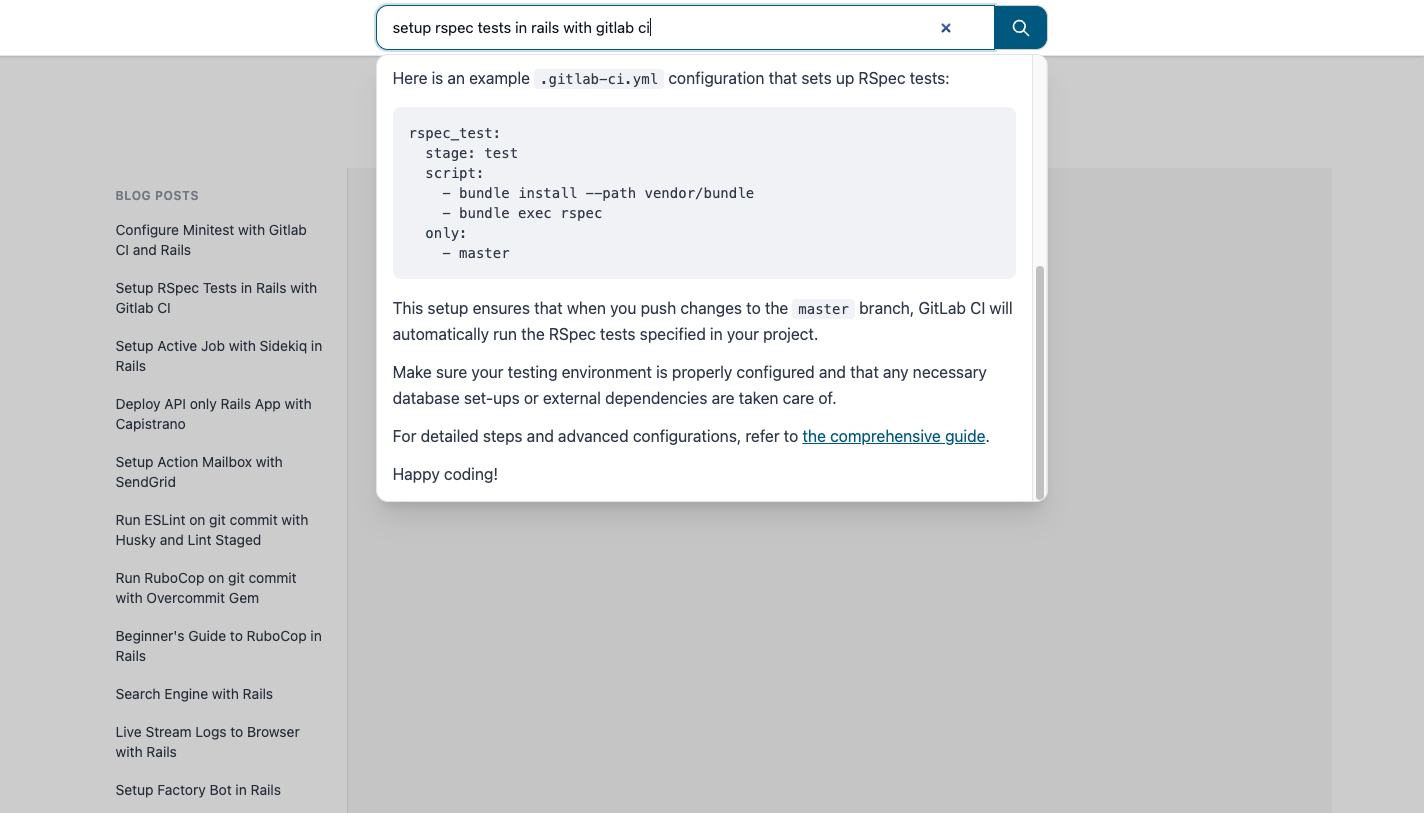
But wait, it only shows answers. How do I know where those answers came from? Where is the link to the blog? That’s what we will implement in the next section.
Displaying sources of the answer #
Users should know which posts the answer came from and be able to open them.
We already store source_url and source_title on each ArticleChunk and set them in the ingest task. The BlogSearch tool should return not only the context string but also a list of { title, url } for the UI.
Replace the BlogSearch tool with the following code to handle source URLs:
# app/tools/blog_search.rb

class BlogSearch < RubyLLM::Tool
  include Rails.application.routes.url_helpers

  description "Searches the author's blog posts for relevant content only."
  param :query, desc: "User question about the blog"

  def execute(query:)
    result = search(query)

    { context: build_context(result), sources: result[:sources] }.to_json
  end

  def search(query)
    q = query.to_s.strip

    return empty_result if q.blank?

    pre_limit = 8

    # Vector (semantic) search
    embedding =
      RubyLLM.embed(q, provider: :ollama, assume_model_exists: true).vectors
    vector_chunks =
      ArticleChunk
        .nearest_neighbors(:embedding, embedding, distance: "cosine")
        .limit(pre_limit)
        .to_a

    return empty_result if vector_chunks.empty?

    context_parts = []
    sources = []

    vector_chunks.each do |chunk|
      app_url =
        chunk.source_url.present? ? article_app_url(chunk.source_url) : nil
      source_line =
        if app_url.present?
          "[Source: #{chunk.source_title} | URL: #{app_url}]"
        else
          "[Source: #{chunk.source_title}]"
        end
      context_parts << <<~TEXT.strip
        #{source_line}
        #{chunk.content}
      TEXT

      sources << { title: chunk.source_title, url: app_url } if app_url
    end

    {
      context: context_parts.join("\n\n---\n\n"),
      sources: sources.uniq { |s| s[:url] }
    }
  end

  private

  def article_app_url(external_url)
    return nil if external_url.blank?

    root_url(article: external_url, host: "http://localhost:3000")
  end

  def empty_result
    { context: "NO_RELEVANT_BLOG_CONTENT", sources: [] }
  end

  def build_context(result)
    <<~TEXT
      BLOG_CONTEXT_START
      #{result[:context]}
      BLOG_CONTEXT_END
    TEXT
  end
end
Update the search_controller to send sources to views:
# app/controllers/search_controller.rb
class SearchController < ApplicationController
  def create
    # ....
    assistant = chat.messages.where(role: "assistant").last
    @sources = extract_sources(chat)
    # ....
  end

  private

  # ....
  def extract_sources(chat)
    tool_msg = chat.messages.where(role: "tool").last
    return [] unless tool_msg

    payload = JSON.parse(tool_msg.content)
    payload["sources"] || []
  rescue StandardError
    []
  end
end
Update system_prompt to return relevant blog post in the answer, append Response format just below the You are FORBIDDEN from using external knowledge block:
# app/controllers/search_controller.rb
def system_prompt
  <<~PROMPT
    You are an assistant that answers questions ONLY using the author's blog.

    ....
    .... existing_code ....
    ....

    You are FORBIDDEN from using external knowledge

    Response format:
    - Start with one or two short sentences summarizing the answer, then use <br /> to break the line.
    - Then give the detailed explanation. Use <br /> to break the line between each paragraph.
    - For lists: use Markdown bullets (- ) or numbers (1. 2. 3. ), with <br /> to break the line before the list and between list items if they are long.
    - Put code or commands in backticks. Use <br /> to break the line before and after code blocks if needed.
    - End with a link when relevant: "For more details, see [Post title](url)." Use only URLs from the context ([Source: ... | URL: ...]); never link to external sites.
    - Use two <br /> (a blank line) between sections so the response is easy to read. Do not output "Summary:" or "Answer:" - just the content.
  PROMPT
end
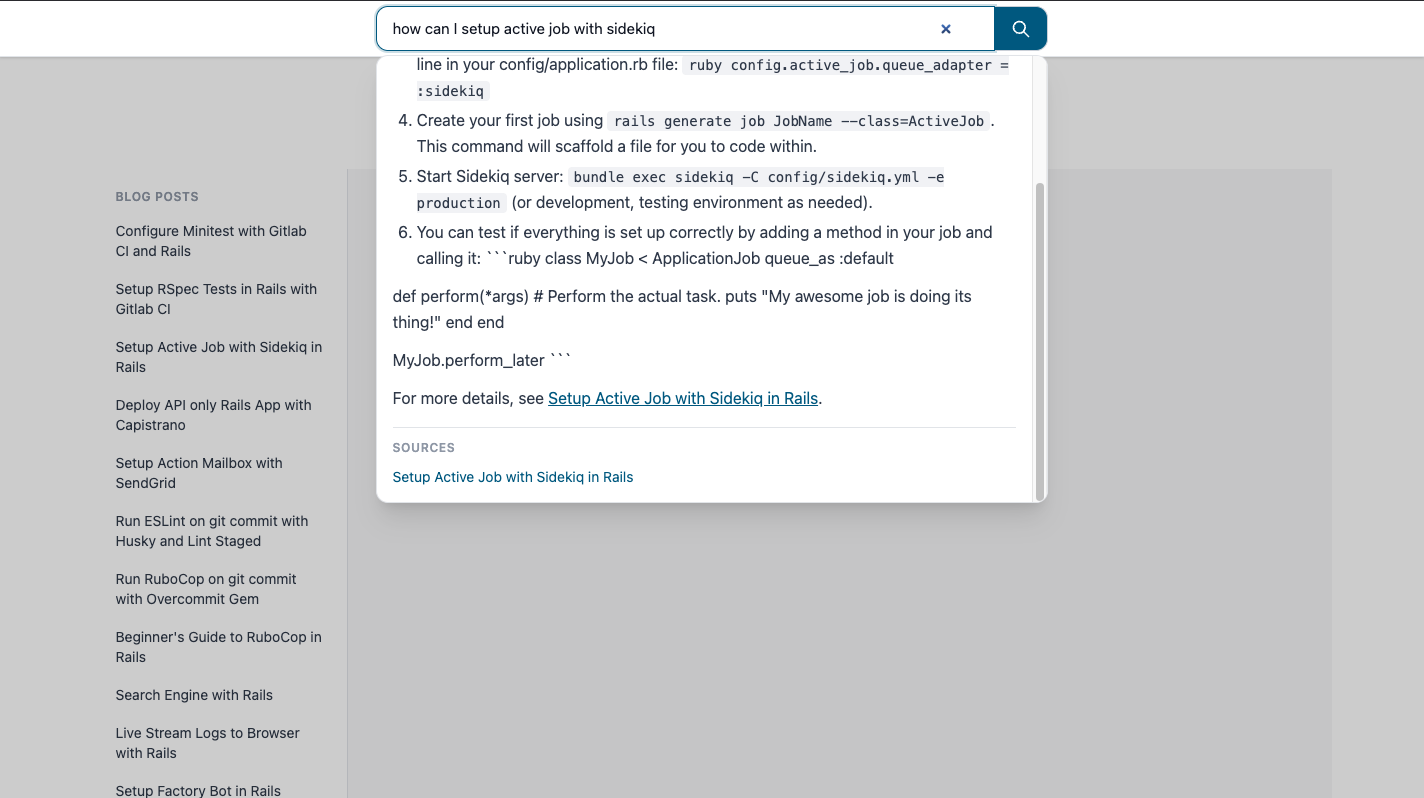
Try searching again, you will see a new “SOURCES” section at the bottom of the answer overlay with a list of sources where answer was extracted from. It is still probably showing irreleavnt links as well, it will go away when we implement the Hybrid search and Re-ranking; coming up next.
Bonus: Hybrid search (vector + keyword) for better output #
Vector search alone can miss exact terms (e.g. “Minitest” or “GitLab CI”). Adding keyword (full-text) search and combining it with vector search often gives more relevant chunks.
Generate a new migration for adding Full-text column on article_chunks:
rails g migration AddFulltextToArticleChunks
Replace the file with the following:
# db/migrate/xxxx_add_fulltext_to_article_chunks.rb
class AddFulltextToArticleChunks < ActiveRecord::Migration[8.1]
  def up
    execute <<-SQL.squish
      ALTER TABLE article_chunks
        ADD COLUMN content_tsv tsvector
        GENERATED ALWAYS AS (
          to_tsvector('english', coalesce(content, '') || ' ' || coalesce(source_title, ''))
        ) STORED;
    SQL
    add_index :article_chunks, :content_tsv, using: :gin
  end

  def down
    remove_index :article_chunks, :content_tsv, if_exists: true
    remove_column :article_chunks, :content_tsv
  end
end
Apply the migration with:
bin/rails db:migrate
Keyword search:
Add a new class method to ArticleChunk model for enabling the keyword_search:
# app/models/article_chunk.rb
def self.keyword_search(query, limit: 100)
  q = query.to_s.strip
  return none if q.blank?
  safe = connection.quote(q)
  where("content_tsv @@ plainto_tsquery('english', ?)", q)
    .order(Arel.sql("ts_rank_cd(content_tsv, plainto_tsquery('english', #{safe})) DESC"))
    .limit(limit)
end
Hybrid search in the tool:
To enable hybrid search, we need to also update the BlogSearch tool.
Run both vector and keyword search, merge the two result lists (e.g. with Reciprocal Rank Fusion), then take the top N:
# app/tools/blog_search.rb
class BlogSearch < RubyLLM::Tool
  # .... Other code ....

  def search(query)
    q = query.to_s.strip
    return empty_result if q.blank?

    pre_limit = 8
    post_limit = 3

    # Vector (semantic) search
    embedding = RubyLLM.embed(q, provider: :ollama, assume_model_exists: true).vectors
    vector_chunks = ArticleChunk.nearest_neighbors(:embedding, embedding, distance: "cosine").limit(pre_limit).to_a

    # Keyword (full-text) search
    keyword_chunks = ArticleChunk.keyword_search(q, limit: pre_limit).to_a

    # Hybrid: merge with Reciprocal Rank Fusion, then cap
    chunks = rrf_merge(vector_chunks, keyword_chunks).first(pre_limit)

    return empty_result if chunks.empty?

    chunks = chunks.first(post_limit)

    context_parts = []
    sources = []

    chunks.each do |chunk|
      app_url = chunk.source_url.present? ? article_app_url(chunk.source_url) : nil
      source_line =
        if app_url.present?
          "[Source: #{chunk.source_title} | URL: #{app_url}]"
        else
          "[Source: #{chunk.source_title}]"
        end
      context_parts << <<~TEXT.strip
        #{source_line}
        #{chunk.content}
      TEXT

      sources << { title: chunk.source_title, url: app_url } if app_url
    end

    {
      context: context_parts.join("\n\n---\n\n"),
      sources: sources.uniq { |s| s[:url] }
    }
  end

  private

  def rrf_merge(vector_list, keyword_list, k: 60)
    scores = Hash.new(0)
    vector_list.each_with_index { |c, i| scores[c.id] += 1.0 / (k + i + 1) }
    keyword_list.each_with_index { |c, i| scores[c.id] += 1.0 / (k + i + 1) }

    all_by_id = (vector_list + keyword_list).index_by(&:id)
    all_by_id.values.sort_by { |c| -scores[c.id] }.uniq(&:id)
  end

  # .... Other code ....
end
Bonus 2: Re-ranking answers for better relevance #
You can also add a reranker by using the LLM to reorder the top candidates by relevance to the query and then pass only the top few chunks to the final answer.
Add a Reranker to app/tools/reranker.rb and add the following content inside it:
# app/tools/reranker.rb
# Reranks a list of ArticleChunk objects by relevance to a query using RubyLLM (Ollama).
# Used internally by BlogSearch; not a tool callable by the assistant.
class Reranker
  INSTRUCTIONS = <<~TEXT.strip.freeze
    You are a relevance judge. Given a query and numbered passages,#{' '}
    output only the passage numbers in order of relevance to the query,#{' '}
    one number per line. No explanation, no other text.
  TEXT

  # @param query [String] user question
  # @param chunks [Array<ArticleChunk>] chunks to rerank
  # @param keep_top [Integer] number of top chunks to return
  # @return [Array<ArticleChunk>] top keep_top chunks in relevance order
  def call(query, chunks, keep_top)
    return chunks.first(keep_top) if chunks.size <= keep_top

    prompt = build_prompt(query, chunks, keep_top)

    response =
      RubyLLM
        .chat(provider: :ollama, assume_model_exists: true)
        .with_model("qwen2.5:7b-instruct")
        .with_temperature(0) # deterministic ranking
        .with_instructions(INSTRUCTIONS)
        .ask(prompt)

    indices = parse_response(response.content, chunks.size, keep_top)

    if indices.blank?
      Rails.logger.warn(
        "[Reranker] LLM returned no valid indices. Returning top #{keep_top} by default."
      )
      return chunks.first(keep_top)
    end

    indices
      .first(keep_top)
      .filter_map { |i| chunks[i] if i.between?(0, chunks.size - 1) }
  rescue StandardError => e
    Rails.logger.warn(
      "[Reranker] Re-rank failed: #{e.message}. Returning top #{keep_top} chunks."
    )
    chunks.first(keep_top)
  end

  private

  def build_prompt(query, chunks, keep_top)
    passages =
      chunks
        .each_with_index
        .map { |c, i| "#{i + 1}. #{c.content.truncate(600)}" }
        .join("\n\n")

    <<~TEXT.strip
      Query: #{query}

      Passages:
      #{passages}

      Return only the numbers 1-#{chunks.size} of the top #{keep_top} most relevant passages,
      one number per line, most relevant first. No other text.
    TEXT
  end

  def parse_response(content, max_index, limit)
    return [] if content.blank?

    lines = content.strip.lines.map(&:strip).reject(&:blank?).first(limit)

    indices = []
    lines.each do |line|
      n = line.to_i
      indices << n - 1 if n.between?(1, max_index) && !indices.include?(n - 1)
    end
    indices
  end
end
Use the Reranker inside the BlogSearch tool by replacing the chunks = chunks.first(post_limit) inside the search method with the reranking conditional logic:
# app/tools/blog_search.rb
class BlogSearch < RubyLLM::Tool
  # .... Other code ....
  def search(query)
    # .... Other code ....
    return empty_result if chunks.empty?

    if chunks.size > post_limit
      chunks = Reranker.new.call(q, chunks, post_limit)
    else
      chunks = chunks.first(post_limit)
    end
    # .... Other code ....
  end
end
This is what the final result could look like with hybrid search, updated prompt and re-ranking:
And done, if you have followed through here then you have come a long way, congratulations!
10. Conclusion #
This was my first real AI app. I chose a RAG app because it seemed easier than other ideas: no training, no fine-tuning, just retrieval + prompting. In practice it still took me about two months to go from “what is RAG?” to a working app with sources, hybrid search, and a prompt I was happy with. The concepts (embeddings, vector search, tool use) were relatively easy; the hard part was not knowing where to start or what to build first.
When I first sat down to plan how to learn and use more AI in my workflow, my notes literally said:
THE MAIN QUESTION IS WHERE DO I START AND WHAT DO I BUILD FIRST ???
If that’s you: starting with a RAG app for your own blog is a solid choice. You’ll learn:
- Prompting — how to instruct the model to stay on your content and format answers.
- Ruby LLM — chat, embeddings, tools, and how they plug into Rails.
- Models — the difference between chat and embedding models, and what “tokens” mean when you’re passing context.
The blog-ai-chat-app repo has the full code: migrations, ingest task, BlogSearch tool, reranker, and Turbo Stream UI. Clone it, run bin/dev and bin/rails blog:ingest, and tinker. If you have questions, reach out via Twitter/X.
Also a disclaimer: I heavily used Cursor to build this app, if you seem some AI slop in the code then that’s Cursor, don’t blame me :P
Thanks for reading. Happy tinkering and happy coding!
References #
- Cover image was generated using Gemini